Real NZ Marlborough -- NZPN (Picton) update for VLC
39 posts
• Page 2 of 2 • 1, 2
 by deaneb » Mon Mar 21, 2011 2:41 pm
toprob wrote:QUOTE (toprob @ Mar 20 2011,12:43 PM) <{POST_SNAPBACK}>Deane -- I'd rather send you a version of the installer which doesn't include the security code -- so the scenery files would install the same way as the texture files. That way at least you'd have access to all the files. It's no good using the installer the way it is if it doesn't work for you. However I'd like to include a little bit of code to read the variables, so I can pinpoint where it is going wrong, if that's ok. Let me know and I'll email the file to you. You'd just have to copy/paste the results into an email back to me.
Success - I re-downloaded the file and it all worked fine this time. Computers - gotta love them !!
-

deaneb - Senior Member
- Joined: Sat Aug 12, 2006 4:40 pm
- Posts: 1565
- Location: Blenheim
by Redda03 » Mon Mar 21, 2011 4:36 pm
Hi Robin,
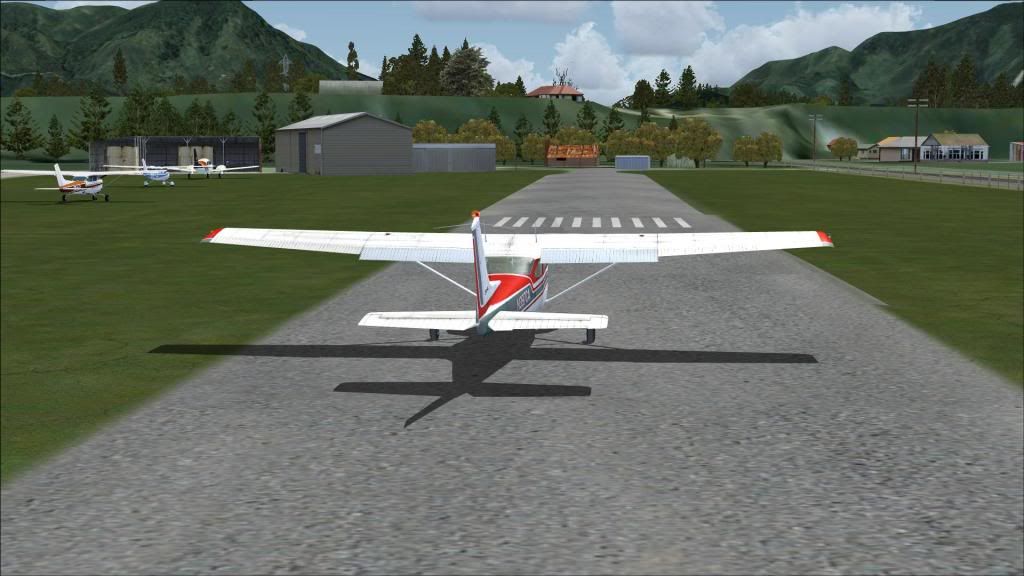
I have come across your pics of NZPN with the NZPN Patch installed....I recently installed the patch and everything appeared great...have now discovered that the rising ground I have off the threshold of RW18 is much more pronounced that what your pics show....refer
I have checked my Addon Scenery/Scenery and Scenery/World/Scenery Folders and there are no NZPN entries.
Cheers,
Bob R
I have come across your pics of NZPN with the NZPN Patch installed....I recently installed the patch and everything appeared great...have now discovered that the rising ground I have off the threshold of RW18 is much more pronounced that what your pics show....refer
I have checked my Addon Scenery/Scenery and Scenery/World/Scenery Folders and there are no NZPN entries.
Cheers,
Bob R
url="http://www.VectorLandclass.co.nz/"]
 [/url]
[/url]- Redda03
- Forum Addict
- Joined: Tue Aug 08, 2006 12:31 pm
- Posts: 205
- Location: Waikanae Beach
by toprob » Mon Mar 21, 2011 5:27 pm
Redda03 wrote:QUOTE (Redda03 @ Mar 21 2011,5:36 PM) <{POST_SNAPBACK}>Hi Robin,
I have come across your pics of NZPN with the NZPN Patch installed....I recently installed the patch and everything appeared great...have now discovered that the rising ground I have off the threshold of RW18 is much more pronounced that what your pics show....refer
I have checked my Addon Scenery/Scenery and Scenery/World/Scenery Folders and there are no NZPN entries.
Cheers,
Bob R
Do you have the VLC patch installed?
-

toprob - NZFF Pro
- Topic author
- Joined: Sat Apr 29, 2006 4:56 pm
- Posts: 6741
- Location: Upper Hutt
by keatles » Mon Mar 21, 2011 9:20 pm
Hi Rob
Downloaded, installed, and wasted the rest of today flying around Marlborough in ever-widening circles just gawking at the scenery.
At one point my wife walked in and said: "Isn't that where we spent three days last year?" It was indeed (just outside Picton).
Great work.
Downloaded, installed, and wasted the rest of today flying around Marlborough in ever-widening circles just gawking at the scenery.
At one point my wife walked in and said: "Isn't that where we spent three days last year?" It was indeed (just outside Picton).
Great work.
Last edited by keatles on Mon Mar 21, 2011 9:20 pm, edited 1 time in total.
Alan
A clear conscience is usually the sign of a poor memory
A clear conscience is usually the sign of a poor memory
-

keatles - Member
- Joined: Wed Sep 02, 2009 11:26 pm
- Posts: 27
- Location: Auckland
by toprob » Tue Mar 22, 2011 2:10 pm
Thanks for the feedback, guys, and the nice comments.
Redda03 wrote:QUOTE (Redda03 @ Mar 21 2011,5:36 PM) <{POST_SNAPBACK}>Hi Robin,
I have come across your pics of NZPN with the NZPN Patch installed....I recently installed the patch and everything appeared great...have now discovered that the rising ground I have off the threshold of RW18 is much more pronounced that what your pics show....refer
I have checked my Addon Scenery/Scenery and Scenery/World/Scenery Folders and there are no NZPN entries.
Cheers,
Bob R
Bob -- we'll continue to try and sort this out via email, but one thing I noticed from your screenshot:
You have plenty of AI -- not that that's a bad thing, I'm glad you have lots of traffic at Picton, but I do wonder how you came to have it. Sometimes addon AI traffic means a matching AFCAD, especially for an airfield like NZPN which doesn't exist as a default FSX airfield.
I'm aware that there are a hundred ways of getting this without installing an additional AFCAD, but worth checking.
-
toprob - NZFF Pro
- Topic author
- Joined: Sat Apr 29, 2006 4:56 pm
- Posts: 6741
- Location: Upper Hutt
by RobdeVries » Fri Jun 17, 2011 10:42 pm
toprob wrote:QUOTE (toprob @ Mar 22 2011,4:10 AM) <{POST_SNAPBACK}>Thanks for the feedback, guys, and the nice comments.
Bob -- we'll continue to try and sort this out via email, but one thing I noticed from your screenshot:
You have plenty of AI -- not that that's a bad thing, I'm glad you have lots of traffic at Picton, but I do wonder how you came to have it. Sometimes addon AI traffic means a matching AFCAD, especially for an airfield like NZPN which doesn't exist as a default FSX airfield.
I'm aware that there are a hundred ways of getting this without installing an additional AFCAD, but worth checking.
Has this issue been resolved because I have the same prblem. VLC 1.01 installed. Marlborough installed with SP2 (latest installer from download store, bought today) and the picton patch.
Further question is it right that Blenheim and Picton both do not have a photoreal airport terrain perimeter underground? Blenheim stick out from the surrounding photoreal terrain like a sour thumb.
- RobdeVries
- Newbie
- Joined: Fri Jun 17, 2011 9:00 pm
- Posts: 8
by toprob » Sat Jun 18, 2011 10:33 am
RobdeVries wrote:QUOTE (RobdeVries @ Jun 17 2011,10:42 PM) <{POST_SNAPBACK}>Has this issue been resolved because I have the same prblem. VLC 1.01 installed. Marlborough installed with SP2 (latest installer from download store, bought today) and the picton patch.
Further question is it right that Blenheim and Picton both do not have a photoreal airport terrain perimeter underground? Blenheim stick out from the surrounding photoreal terrain like a sour thumb.
Do you mean a problem with the elevation as shown in Redda03's screenshot?
The Marlborough airfields have varying types of ground textures, none have high resolution textures though. Woodbourne is basically just a dry grass pattern.
I haven't been able to reproduce the mismatched elevations at Picton, so it would be good to solve this -- I have promised the 'final' version of the patch, but I'm not really able to release it until I get this sorted. However the only change in the final version is the addition of road traffic to align it with the photo highway.
Could you (or anyone else with this problem) let me know what other NZ addons you have.
-
toprob - NZFF Pro
- Topic author
- Joined: Sat Apr 29, 2006 4:56 pm
- Posts: 6741
- Location: Upper Hutt
by RobdeVries » Mon Jun 20, 2011 1:07 am
toprob wrote:QUOTE (toprob @ Jun 18 2011,12:33 AM) <{POST_SNAPBACK}>Could you (or anyone else with this problem) let me know what other NZ addons you have.
Hi Robin,
-VLC 1.01
-Marlborough (+Picton patch).
-Wellington
-Auckland
-Rotorua
-Paraparaumu
-Tauranga
-Bop Islands
- RobdeVries
- Newbie
- Joined: Fri Jun 17, 2011 9:00 pm
- Posts: 8
by sundayflyer » Mon Jun 20, 2011 2:56 pm
I have the same problem as well by the looks of it. Have all of the payware NZ seneries. This is what came I think with Robins Marlborough. It does not look as though I have any patch installed. I don't use Picton because of this rising ground off runway 18.
Cheers.

Cheers.
Last edited by sundayflyer on Mon Jun 20, 2011 3:02 pm, edited 1 time in total.
Daryl
-

sundayflyer - Member
- Joined: Sun Jun 04, 2006 4:04 pm
- Posts: 43
- Location: Havelock North
by Redda03 » Mon Jun 20, 2011 8:19 pm
toprob wrote:QUOTE (toprob @ Jun 22 2011,11:33 PM) <{POST_SNAPBACK}>Do you mean a problem with the elevation as shown in Redda03's screenshot?
Hi Rob,
I see that a couple of other members are having a similar problem I had (rising ground to the north) after installing VLC and Patch earlier this year.
We corresponded by email during Mar .... you suggested I check that my Red Baron 20m Mesh was disabled ....it wasn't, and after disabling the rising ground disappeared!!!
Hope this will be of help to sundayflyer and RobdeVries....
Cheers,
Bob Rurl="http://www.VectorLandclass.co.nz/"]
- Redda03
- Forum Addict
- Joined: Tue Aug 08, 2006 12:31 pm
- Posts: 205
- Location: Waikanae Beach
by toprob » Mon Jun 20, 2011 8:38 pm
Cheers, Bob, I did recall that this was the outcome, I just overlooked following it up here.
However it does look like in Daryl's case the patch is not installed. I think there was a problem with the original beta, with 64bit systems, but I thought I'd fixed that. I will upload a new, hopefully final version this week.
However it does look like in Daryl's case the patch is not installed. I think there was a problem with the original beta, with 64bit systems, but I thought I'd fixed that. I will upload a new, hopefully final version this week.
-
toprob - NZFF Pro
- Topic author
- Joined: Sat Apr 29, 2006 4:56 pm
- Posts: 6741
- Location: Upper Hutt
by sundayflyer » Mon Jun 20, 2011 10:59 pm
My screen shows Picton in FSX, Windows 7 64bit with no patch installed. Hope this helps.
Cheers.
Cheers.
Daryl
-
sundayflyer - Member
- Joined: Sun Jun 04, 2006 4:04 pm
- Posts: 43
- Location: Havelock North
by RobdeVries » Sat Jul 02, 2011 3:22 am
Redda03 wrote:QUOTE (Redda03 @ Jun 20 2011,10:19 AM) <{POST_SNAPBACK}>you suggested I check that my Red Baron 20m Mesh was disabled ....
But I don't have the Red Baron mesh. However I do have Win7 64bit.
So what could it be?Last edited by RobdeVries on Sat Jul 02, 2011 3:23 am, edited 1 time in total.
- RobdeVries
- Newbie
- Joined: Fri Jun 17, 2011 9:00 pm
- Posts: 8
by toprob » Sat Jul 02, 2011 10:52 am
RobdeVries wrote:QUOTE (RobdeVries @ Jul 2 2011,3:22 AM) <{POST_SNAPBACK}>But I don't have the Red Baron mesh. However I do have Win7 64bit.
So what could it be?
The original upload on 16 March didn't appear to work with Win64, so I replaced the upload on 20 March. I think that this one worked fine, so this depends on when you downloaded the file -- if you downloaded it when it was originally released, then it may not have installed anything at all.
If it is likely that you used the original download, let me know, otherwise you could try re-downloading and see if it makes a difference.
-
toprob - NZFF Pro
- Topic author
- Joined: Sat Apr 29, 2006 4:56 pm
- Posts: 6741
- Location: Upper Hutt
by sundayflyer » Sat Jul 02, 2011 5:49 pm
Hi Rob,
You are right I have never installed a NZPN patch. So my screen shows the original NZPN from your Marlborough disc for FSX.
Where do I get this patch from? The one attached to this thread is dated 16.03.2011, yet you mention a further update on the 20.03.2011 which I do not seem to be able to find anywhere.
Cheers.
You are right I have never installed a NZPN patch. So my screen shows the original NZPN from your Marlborough disc for FSX.
Where do I get this patch from? The one attached to this thread is dated 16.03.2011, yet you mention a further update on the 20.03.2011 which I do not seem to be able to find anywhere.
Cheers.
Daryl
-
sundayflyer - Member
- Joined: Sun Jun 04, 2006 4:04 pm
- Posts: 43
- Location: Havelock North
by nzkingair » Thu Jul 07, 2011 9:07 am
toprob wrote:QUOTE (toprob @ Mar 16 2011,12:26 PM) <{POST_SNAPBACK}>This is ready for final testing, I just need a few members to run the update and let me know if anything untoward happens.
It requires an installed Real New Zealand Marlborough (or Across the Strait) and is built for use with VLC, but it will install if you don't have VLC -- try it, but you'll be missing some VLC library objects such as fences etc.
There is no 'un-patch' included, so you might want to back-up your RealNZmarlborough folder first. The patch only affects the contents of the RealNZmarlborough folder though.
[attachment=437:NZPNupdate.zip]
I Robin,
Have finally caught up. I have been looking in the ARNZ forum for the update... Was talking to Tim Barnes and he pointed me here. For your info on this update. I am running both Win 7 32 & 64 bit with FSX on both ( separate drives!! ) It won't install in 64, - I can't even find the files anywhere, and compared with the 32 install the installer cuts off very quickly ( I do not think the files are being installed at all )
Installation into 32 was fine -- looks great. I then used a bit of scull duggery and copy and pasted Marborough into 64. Works fine
Cheers
Warren
Tauraunganzkingair
-

nzkingair - Member
- Joined: Wed Jul 06, 2011 9:54 pm
- Posts: 28
- Location: Tauranga
39 posts
• Page 2 of 2 • 1, 2
Return to Godzone 'Real New Zealand' Scenery Support
Who is online
Users browsing this forum: No registered users and 15 guests