Page 1 of 1

PostPosted: Tue Jan 12, 2010 8:05 pm
by toprob
Just a note to clarify the current state of the NZFF online play.

A couple of months ago Ian Warren set up a multiplayer server and Teamspeak server for use by NZFF. Thanks for offering to host this himself. You may recall an announcement that there was a new NZFF site to handle this server -- nzffmp.org. I queried the need for this site, but my main concern was that it gave the impression that it represented NZFF, without any admin authority. Since then the site has been closed, and I understand that the Teamspeak server is not available at the moment. Ian Warren has taken on the job of sorting this out -- by the way, I'd like to welcome Ian as a moderator:) -- and hopefully we'll have something more permanent shortly.

In the meantime I've installed a temporary Teamspeak 3 server, which is being tested at the moment. Once I know that it'll work, I'll release details. However since this runs on my development computer, it may not be 100% reliable. I do need to reboot the computer quite often during the day, and work needs to take priority, so if you are disconnected at any time please just reconnect after a 5 minute wait.

PostPosted: Tue Jan 12, 2010 11:24 pm
by Ian Warren
The address is now for NZFF flightsim multiplay , we will keep you posted with updates , currently still using TS2

Teamspeak Server: fs.servegame.com:8767

Special Thanks to Matt to get us up and running so quick , we are looking for a new setup and server , TS3 and look at FS Host for the FS9,s

PostPosted: Thu Jan 14, 2010 2:15 pm
by ZK-MAT
Ian Warren wrote:
QUOTE (Ian Warren @ Jan 13 2010, 12:24 AM) <{POST_SNAPBACK}>
The address is now for NZFF flightsim multiplay , we will keep you posted with updates , currently still using TS2

Teamspeak Server: fs.servegame.com:8767

Special Thanks to Matt to get us up and running so quick , we are looking for a new setup and server , TS3 and look at FS Host for the FS9,s


No worries at all, pleased to help out where I can. I have put Teamspeak and FS Host Server on a box that is dedicated for just this use, it uses our home internet bandwidth and data download allowance so really it's just a temporary measure for NZFF, that I will review when we get the next account from Telstra! If the kids or I am hard out gaming, XBoxing, downloading or watching YouTube it could slow things down a bit but so far it looks like most will get a 40 - 70 ping which is ok. TS and FS Host uses bugger all data from past experiences.

The status page for the Multiplayer Server is:

http://fs.servegame.com/ - An easy way to see who is on and where they are in the FS world.

It will accept FS2002 / 2004 / FSX connections, to see what you need to connect visit:

http://www.chocolatesoftware.com/fshost/

All you need for FS2002 and 2004 is the IP address, no special programs needed. For FSX you need the FS Host client, which is an easy download and install.

Hope this helps smile.gif

PostPosted: Tue Jan 19, 2010 10:40 am
by ZK-MAT
Hiya

A few have been using the FS Host server and I see that the default (Hawaii) hoplist has been flown a few times by some.

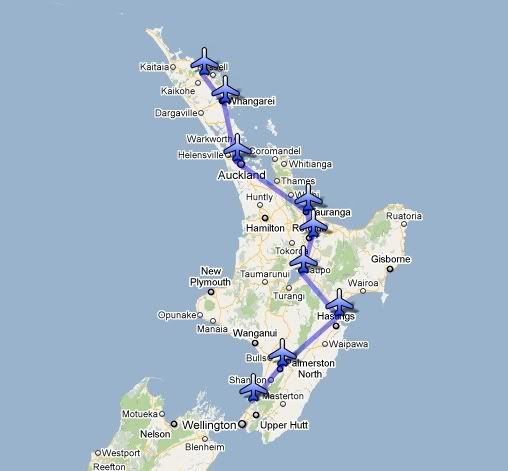
I have created a short North Island hoplist, which avoids main airfields, starts at Kerikeri and ends in Paraparaumu. It's 8 stages and covers 437 nautical miles. Here's the route:


Feel free to give it a go, light to medium GA planes would be best, or heavies for a challenge! I'm off work today and may jump on this afternoon to try it out. The connection details are as above, FS2002, 2004 and FSX players can join.

To activate the tour, start at NZKK, and type "?hop" (without quotations) in the multiplayer chat window. It will give you the direction to travel to the next airport. You can type "?help" at any time for server commands. It will remember your place so you can disconnect and come back later on to resume where you last landed.

If people use this and are keen I'll do a South Island one next.

Matt

PostPosted: Tue Jan 19, 2010 10:43 am
by Ian Warren
I try this in the weekend if i get chance , currently doing some work the airshow requires little more time than normal .

PostPosted: Wed Feb 10, 2010 4:39 pm
by ZK-MAT
Hiya

I have shut down the PC that was used as a server for Teamspeak 2 and FS Host as we now have a permanent solution for TS (see here).

The FS Host server was used by a few NZFF people, but more unfamiliar than familiar names used it so I'll can it for now at least. Thanks to all that gave it a go, I hope it worked ok for you, not bad for an old Dell desktop with 256 meg Ram and a p2 processor that ran for over amonth non stop!

Matt

PostPosted: Wed Feb 10, 2010 7:36 pm
by creator2003
Thank you Matt for hosting the TS server and for your donated bandwith thumbup1.gif