Four Tiffy's

A forum to share your FS video clips and movies

Postby Charl » Sun Feb 03, 2008 8:04 am

When you hand fly formations, the aim is to stick to the leader and make the moves on a countdown.
With Recorder Module tracks the aim is the reverse:
You start with a/c that look as if they are connected by a ladder, and try to loosen them up for realism.
You do this by making the offsets a little different for each a/c, and using different time offsets for each.
Here's the result, some moves are still a little "ladder-like" but there are bits quite realistic I reckon.


Please excuse the jitters, I have again messed up the scenery and mesh which took its toll.
Last edited by Charl on Sun Feb 03, 2008 8:04 am, edited 1 time in total.
User avatar
Charl
NZFF Pro
 
Topic author
Joined: Mon May 01, 2006 8:28 am
Posts: 9691
Location: Auckland

Postby victor_alpha_charlie » Sun Feb 03, 2008 9:36 am

Awesome! The one problem I had was I used a B-2 stealth bomber as a leader, and tried to set two Beech Mentors 30 feet in front and 15 feet each side. When the B-2 overtook them, I thought they must be too slow and replaced them with two of Kirk Olsson's awesome F-16s. Same thing happened. Why are the F-16's slower than a B-2? Can't they push the throttle forward and stay ahead? I noticed they didn't use the Afterburner on takeoff.
Last edited by victor_alpha_charlie on Sun Feb 03, 2008 9:38 am, edited 1 time in total.
User avatar
victor_alpha_charlie
NZFF Pro
 
Joined: Wed Jan 10, 2007 11:09 am
Posts: 2372

Postby Q300 » Sun Feb 03, 2008 9:42 am

Wow realy nice work Charl! I loved that 'loop' at the end that was sweet :clap:
I have to give this ago :plane:
User avatar
Q300
Sim-holic
 
Joined: Wed Apr 25, 2007 4:41 pm
Posts: 699
Location: Auckland, ATM!

Postby creator2003 » Sun Feb 03, 2008 9:45 am

Nice one charl i really have to learn that recorder better ,i take it this mite work with choppers aswell ?
User avatar
creator2003
NZFF Pro
 
Joined: Fri Jun 16, 2006 12:08 am
Posts: 4633
Location: Cant U C im LOCO

Postby Ian Warren » Sun Feb 03, 2008 9:46 am

DAMM ... NO Rockets !..... :o can vid be edited , add special effects after finish (sorta frameXframe ?) ....... Explosions/smoke
Image
User avatar
Ian Warren
NZFF Pro
 
Joined: Fri May 05, 2006 5:23 pm
Posts: 41187
Location: AREA 51

Postby creator2003 » Sun Feb 03, 2008 10:21 am

QUOTE
can vid be edited , add special effects after finish (sorta frameXframe ?) ....... Explosions/smoke[/quote]
Yup sure can you can do it with overlays or use programs to edited them in after "adobe prem after effects " or with some graphic work ,there are many ways to do it but each with time and skill ...
User avatar
creator2003
NZFF Pro
 
Joined: Fri Jun 16, 2006 12:08 am
Posts: 4633
Location: Cant U C im LOCO

Postby victor_alpha_charlie » Sun Feb 03, 2008 10:30 am

creator2003 wrote:
QUOTE (creator2003 @ Feb 3 2008, 10:45 AM) <{POST_SNAPBACK}>
Nice one charl i really have to learn that recorder better ,i take it this mite work with choppers aswell ?


It's really quite easy, it probably takes 5 mins tops to make somethign like Charl did. Read his Four Times Cap-10 thread for instructions.
User avatar
victor_alpha_charlie
NZFF Pro
 
Joined: Wed Jan 10, 2007 11:09 am
Posts: 2372

Postby ardypilot » Sun Feb 03, 2008 12:59 pm

QUOTE
and using different time offsets for each.[/quote]
Could you copy and paste me an example of this please? I must be doing something wrong because all my time offsets in formation lag far too behind for the aircraft to even remain in a group.

QUOTE
The one problem I had was I used a B-2 stealth bomber as a leader, and tried to set two Beech Mentors 30 feet in front and 15 feet each side. When the B-2 overtook them, I thought they must be too slow and replaced them with two of Kirk Olsson's awesome F-16s. Same thing happened.[/quote]
How did the B2 "overtake"? I thought the whole idea of the RM was to have all your aircraft flying in time with each other?
User avatar
ardypilot
NZFF Pro
 
Joined: Wed Apr 26, 2006 10:01 am
Posts: 6802
Location: Auckland

Postby victor_alpha_charlie » Sun Feb 03, 2008 1:02 pm

Trolly wrote:
QUOTE (Trolly @ Feb 3 2008, 01:59 PM) <{POST_SNAPBACK}>
How did the B2 "overtake"? I thought the whole idea of the RM was to have all your aircraft flying in time with each other?


It just happens with all aircraft- I tried today with 3 Heinkel Salamanders. I set them all beside each other, and the lead/original plane just gets slowly further and further ahead.
User avatar
victor_alpha_charlie
NZFF Pro
 
Joined: Wed Jan 10, 2007 11:09 am
Posts: 2372

Postby Ian Warren » Sun Feb 03, 2008 2:23 pm

creator2003 wrote:
QUOTE (creator2003 @ Feb 3 2008, 10:21 AM) <{POST_SNAPBACK}>
Yup sure can you can do it with overlays or use programs to edited them in after "adobe prem after effects " or with some graphic work ,there are many ways to do it but each with time and skill ...

mmmmmm an entire WAR MOVIE .. :D best i play with even creating a movie
Image
User avatar
Ian Warren
NZFF Pro
 
Joined: Fri May 05, 2006 5:23 pm
Posts: 41187
Location: AREA 51

Postby Charl » Sun Feb 03, 2008 2:43 pm

victor_alpha_charlie wrote:
QUOTE (victor_alpha_charlie @ Feb 3 2008, 10:36 AM) <{POST_SNAPBACK}>
... Why are the F-16's slower than a B-2? ...
It's all in the tracks - I suspect you could put a flying bicycle in and it would behave the same...

creator2003 wrote:
QUOTE (creator2003 @ Feb 3 2008, 10:45 AM) <{POST_SNAPBACK}>
Nice one charl i really have to learn that recorder better, i take it this mite work with choppers aswell ?
Thanks Mike, yes you can do with choppers. Just make it AI first of course.

victor_alpha_charlie wrote:
QUOTE (victor_alpha_charlie @ Feb 3 2008, 11:30 AM) <{POST_SNAPBACK}>
It's really quite easy, it probably takes 5 mins tops to make somethign like Charl did.
Quite right. The rest of the day you spend trying to tweak it so it works :lol:

Trolly wrote:
QUOTE (Trolly @ Feb 3 2008, 01:59 PM) <{POST_SNAPBACK}>
Could you copy and paste me an example of this please? I must be doing something wrong because all my time offsets in formation lag far too behind for the aircraft to even remain in a group.
Andrew here are the offsets used for the video:
// Track 2
$Offset: 15 0 0
$TimeOffset: 0.26
// Track 3
$Offset: 29 0 0
$TimeOffset: 0.50
// Track 4
$Offset: 47 0 0
$TimeOffset: 0.85

Ian Warren wrote:
QUOTE (Ian Warren @ Feb 3 2008, 03:23 PM) <{POST_SNAPBACK}>
best i play with even creating a movie
We are all waiting for this, young man :plane:
User avatar
Charl
NZFF Pro
 
Topic author
Joined: Mon May 01, 2006 8:28 am
Posts: 9691
Location: Auckland

Postby ardypilot » Sun Feb 03, 2008 9:28 pm

QUOTE
Andrew here are the offsets used for the video:
// Track 2
$Offset: 15 0 0
$TimeOffset: 0.26
// Track 3
$Offset: 29 0 0
$TimeOffset: 0.50
// Track 4
$Offset: 47 0 0
$TimeOffset: 0.85[/quote]
Cheers, those tiny increments make such a big difference in the formation performance, with one aircraft turning slightly after the other everything seems more fluid:
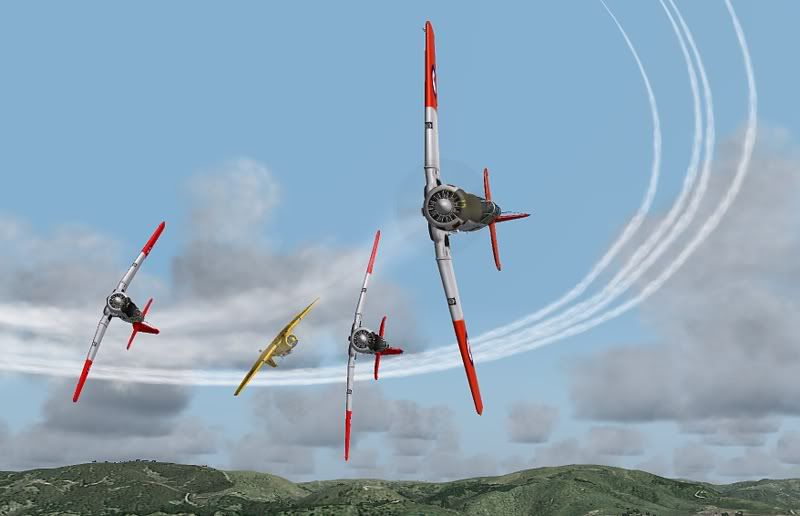
I had to subtract some numbers off the X axis in the first offset (distance behind lead aircraft) to compensate for the time lagg, but it really works out tons better than before!

Got any more recorder module tricks up your sleeve you wish to share Charl? :P


EDIT: After a lot of trial and error, I think I've come up with the perfect four man Harvard formation offsets:
Code: Select all
// Track 1
#Aircraft: "ALPHA T-6 Texan RNZAF  NZ1015"
#StaticCGtoGround: 5.44000
#Data:       latitude        longitude    altitude     pitch      bank   heading  onground    velocityX    velocityY    velocityZ  throttle1  throttle2  throttle3  throttle4  elevators  ailerons  rudder  spoilers  flaps  gear  lights  parkbrake  engine1  engine2  engine3  engine4   timestamp

// Track 2
#Aircraft: "ALPHA T-6 Texan RNZAF  NZ1057"
#StaticCGtoGround: 5.44000
#Data:       latitude        longitude    altitude     pitch      bank   heading  onground    velocityX    velocityY    velocityZ  throttle1  throttle2  throttle3  throttle4  elevators  ailerons  rudder  spoilers  flaps  gear  lights  parkbrake  engine1  engine2  engine3  engine4   timestamp
$Offset: 0 -2 1 h
$TimeOffset: 0.26


// Track 3
#Aircraft: "ALPHA T-6 Texan RNZAF  NZ1053"
#StaticCGtoGround: 5.44000
#Data:       latitude        longitude    altitude     pitch      bank   heading  onground    velocityX    velocityY    velocityZ  throttle1  throttle2  throttle3  throttle4  elevators  ailerons  rudder  spoilers  flaps  gear  lights  parkbrake  engine1  engine2  engine3  engine4   timestamp
$Offset: 10 00 2 h
$TimeOffset: 0.16

// Track 4
#Aircraft: "ALPHA T-6 Harvard NZ1078"
#StaticCGtoGround: 5.44000
#Data:       latitude        longitude    altitude     pitch      bank   heading  onground    velocityX    velocityY    velocityZ  throttle1  throttle2  throttle3  throttle4  elevators  ailerons  rudder  spoilers  flaps  gear  lights  parkbrake  engine1  engine2  engine3  engine4   timestamp
$Offset: -10 00 2 h
$TimeOffset: 0.21

Just copy and paste these sections into your own recorded .frc txt file and replace the top sections with mine- works a treat!

Sorry for taking this thread compleatly off topic!
Last edited by ardypilot on Sun Feb 03, 2008 9:50 pm, edited 1 time in total.
User avatar
ardypilot
NZFF Pro
 
Joined: Wed Apr 26, 2006 10:01 am
Posts: 6802
Location: Auckland


Return to FS Videos

Who is online

Users browsing this forum: No registered users and 6 guests