MSFS 2024 Community folder location
 Posted: Thu Nov 21, 2024 7:49 pm
This has been brought up here, so I'll just post this here in case anyone is looking to install 2024. The Community folder, by default, has a weird long pathname, and when you install the sim there doesn't seem to be any way to change this. However you can change this from within the simulator -- just go to the Marketplace, click on the My Library tab, and look for the little settings button beside the search box off to the right of the screen. Here you can choose any location which suits.
Note that this relocates the whole Packages folder, which includes Community and Official folders. There shouldn't be anything in either when you first install the sim.
This is just an automated way of updating the OPT file with the path, I did it the hard way before finding out how easy it was.

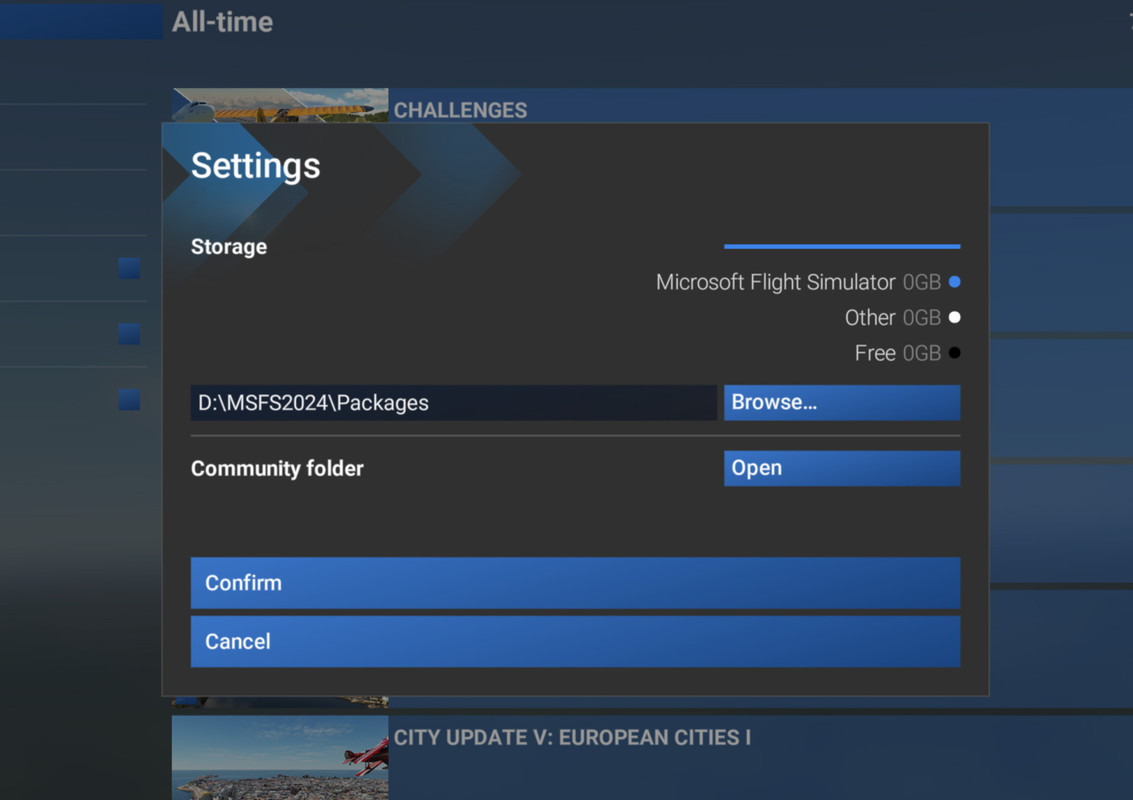
Note that this relocates the whole Packages folder, which includes Community and Official folders. There shouldn't be anything in either when you first install the sim.
This is just an automated way of updating the OPT file with the path, I did it the hard way before finding out how easy it was.