 Posted: Wed Dec 05, 2012 12:41 pm
Well I've been humming and haa-ing for some time now about whether to build a new PC with the latest and greatest hardware.
The last time I did this was in December 2009, my first complete build from scratch, using a Gigabyte GA-790XT-UD4P mobo with an AMD Phenom II 955BE CPU, Coolermaster V8 cooler, 6 GB of DDR3 G.skill ram and a GTX 285 video card. This lot was housed in a Thermaltake V9 case with an Antec 750 w PSU. I've had my sims running on a WD 320 Gb Raptor 10,000 RPM mechanical drive.
I later upgraded the CPU to the X1090T 6 core processor from AMD with a marginal performance increase for FSX. I have been able to get a stable 3.6 - 3.8 Ghz overclock depending on ambient temperatures. Not as high as I would like but every bit helps.
Until now this has been my simming PC and it has performed well with high settings on FSX with all the trimmings (REX, FTX, VLC, PMDG etc etc). I recently started flying DCS A-10 and Falcon 4 BMS and these sims, well DCS anyway, have definitely pushed this AMD build to its limits.
My 285 is well past it and I've always dreamed of building a system using a fast i7 chip, so you know where I'm going with this...
Now I haven't gone crazy with the spend but I think I've covered myself for at least another three years and my hardware should comfortably run every program on the market at the moment with room to spare but the proof of the pudding will be in the installing!
So without further ado here's what I've gone for:
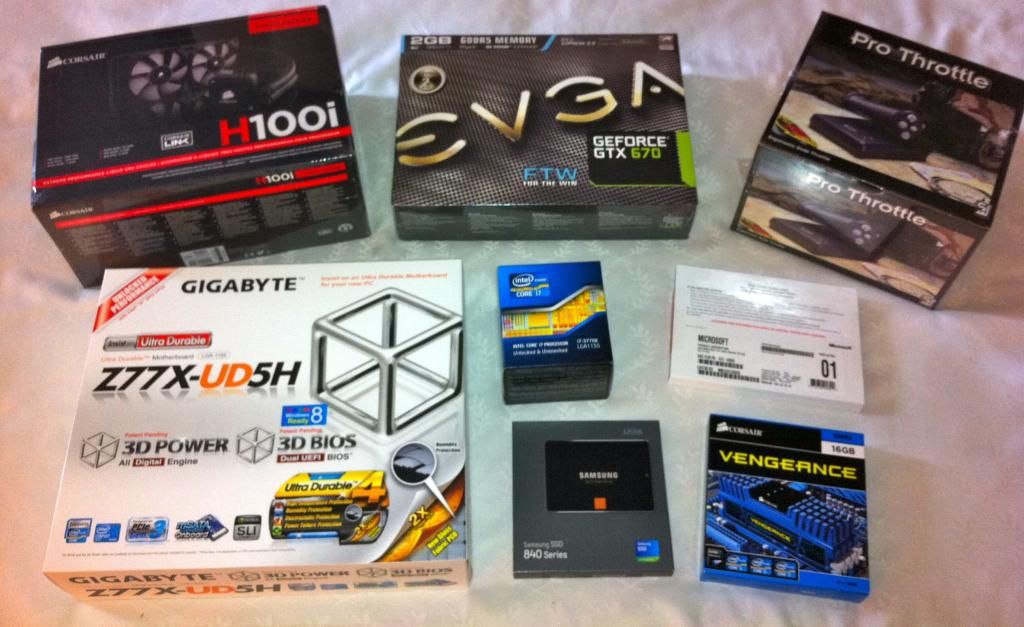
Mobo: Gigabyte Z77X-UD5H
I've decided to stick with Gigabyte for the motherboard as I their 790 board hasn't let me down and I feel obliged to continue supporting them. (Because they need me I'm sure...).
This board is optimised for use with unlocked i7 chips so should be good for overclocking.
CPU: Intel i7 3770K 3.5 Ghz.
I've read a lot of reviews and comparisons and it is clear that the slightly older Sandy bridge i7 2700K chip is a better overclocker than this new Ivy bridge model but in saying that the processes are faster so a lower multiplier offers equivalent performance to a higher clocked Sandy bridge chip and at a lower temperature to boot. Most of the innovation on this newer chip is actually in the on board GPU capabilities which I won't be utilising but hey, its the new generation 'tock' of the i7 and it will certainly handle most of what I can throw at it! Seen as upgrades like this don't happen often I decided to go with the newest tech available today.
Cooler: Corsair H100i liquid CPU cooler
Ok, so this is my first foray into liquid cooling and I know purists will shake their fists that I'm suggesting an out of the box cooling solution could even be consider 'liquid'. But my focus is on simplicity and styling and I'm not really that interested in spending loads of time and money on a complicated water cooling system. The H100i has only just been released and isn't available in NZ yet (well it wasn't a couple of weeks ago) and features improvements over the original H100 model. A tidier tubing solution and redesigned radiator are the main features which add up to a more efficient, quieter cooler.
I can't wait to install this puppy and see how well it performs. I'm hopeful I can get a stable 4.5 Ghz out of the chip...
Chasis / Case: Corsair 600T Silver
The Thermaltake V9 I've used till now is a nice enough case, plenty of room and has cool LED's and the clear window, but I just never really fell in love with it. I bought it at an electronics market in China ,out of frustration in some ways as I couldn't find exactly what I was looking for and it was near on impossible to communicate what I wanted with the sales people so when they presented the V9 it was a case of 'scuse the pun, close enough.
The top mounted 240mm fan grind's against the mesh and its virtually impossible to disassemble that part of the case. (This is a common problem for the V9 and a major design flaw).
The 600T however, was exactly what I wanted. I always thought I would go for a Lian Li or NZXT case for my next build but after watching several video's and reviews of this case I decided it was the one for me.
A major factor in deciding to go for the Corsair case is the ability to mount the radiator for the H100i, it just requires removal of the top two 120mm fans which could be added to the radiator in a push-pull configuration but I'll see how difficult that is when I get home.
Graphics card: EVGA GTX 670 FTW 2 Gb DDR5
Not much to say about this one. It seems to be the best single GPU card on the market at the moment. It's easily the most expensive component of the build. I could have gone for the 4 Gb version but it seemed unnecessary given the performance of the rest of the gear and the CPU intensive nature of most of the sim's I will be using.
RAM: Corsair Vengeance 4x4 Gb DDR3 1600
I was hoping to get 2x8 to keep the option of going to 32 Gb open but it was going to be tricky to have everything shipped together due to availability so I opted for the 4x8 for simplicities sake. The latency's are also better on the smaller sticks. In any case 16 Gb is beyond my comprehension but its relatively cheap so why not! (I remember the excitement of 8 megabytes of ram with my 486 DX2/50, my first decent PC!)
SSD: Samsung 840 120 Gb.
My first foray into solid state hard drives. I'm going to install a new build W7 64 bit OS onto it and hopefully add FSX and my other sims as well depending on space. I'm not really 100% on this aspect. I might end up getting another SSD for the sims and using the Raptor as well. I have a 1.5 Tb HDD for storage in my AMD system so between the three of them I'll figure something out. Really looking forward to seeing the SSD in action anyway. I can't imagine what a idle state boot up in a few seconds must be like let alone load times for FSX and BMS etc!
To round out I'll use my current Antec 750 PSU which hasn't missed a beat. I've also grabbed the CH throttle to go with my CH combatstick and pedals. I've had these for a few years and they are great but I needed a better HOTAS solution for my new sim career as a fighter pilot and look at all the stuff I've got for the price of a Warthog (or two).
Next phase begins with the build itself so stay tuned!
Dave
The last time I did this was in December 2009, my first complete build from scratch, using a Gigabyte GA-790XT-UD4P mobo with an AMD Phenom II 955BE CPU, Coolermaster V8 cooler, 6 GB of DDR3 G.skill ram and a GTX 285 video card. This lot was housed in a Thermaltake V9 case with an Antec 750 w PSU. I've had my sims running on a WD 320 Gb Raptor 10,000 RPM mechanical drive.
I later upgraded the CPU to the X1090T 6 core processor from AMD with a marginal performance increase for FSX. I have been able to get a stable 3.6 - 3.8 Ghz overclock depending on ambient temperatures. Not as high as I would like but every bit helps.
Until now this has been my simming PC and it has performed well with high settings on FSX with all the trimmings (REX, FTX, VLC, PMDG etc etc). I recently started flying DCS A-10 and Falcon 4 BMS and these sims, well DCS anyway, have definitely pushed this AMD build to its limits.
My 285 is well past it and I've always dreamed of building a system using a fast i7 chip, so you know where I'm going with this...
Now I haven't gone crazy with the spend but I think I've covered myself for at least another three years and my hardware should comfortably run every program on the market at the moment with room to spare but the proof of the pudding will be in the installing!
So without further ado here's what I've gone for:
Mobo: Gigabyte Z77X-UD5H
I've decided to stick with Gigabyte for the motherboard as I their 790 board hasn't let me down and I feel obliged to continue supporting them. (Because they need me I'm sure...).
This board is optimised for use with unlocked i7 chips so should be good for overclocking.
CPU: Intel i7 3770K 3.5 Ghz.
I've read a lot of reviews and comparisons and it is clear that the slightly older Sandy bridge i7 2700K chip is a better overclocker than this new Ivy bridge model but in saying that the processes are faster so a lower multiplier offers equivalent performance to a higher clocked Sandy bridge chip and at a lower temperature to boot. Most of the innovation on this newer chip is actually in the on board GPU capabilities which I won't be utilising but hey, its the new generation 'tock' of the i7 and it will certainly handle most of what I can throw at it! Seen as upgrades like this don't happen often I decided to go with the newest tech available today.
Cooler: Corsair H100i liquid CPU cooler
Ok, so this is my first foray into liquid cooling and I know purists will shake their fists that I'm suggesting an out of the box cooling solution could even be consider 'liquid'. But my focus is on simplicity and styling and I'm not really that interested in spending loads of time and money on a complicated water cooling system. The H100i has only just been released and isn't available in NZ yet (well it wasn't a couple of weeks ago) and features improvements over the original H100 model. A tidier tubing solution and redesigned radiator are the main features which add up to a more efficient, quieter cooler.
I can't wait to install this puppy and see how well it performs. I'm hopeful I can get a stable 4.5 Ghz out of the chip...
Chasis / Case: Corsair 600T Silver
The Thermaltake V9 I've used till now is a nice enough case, plenty of room and has cool LED's and the clear window, but I just never really fell in love with it. I bought it at an electronics market in China ,out of frustration in some ways as I couldn't find exactly what I was looking for and it was near on impossible to communicate what I wanted with the sales people so when they presented the V9 it was a case of 'scuse the pun, close enough.
The top mounted 240mm fan grind's against the mesh and its virtually impossible to disassemble that part of the case. (This is a common problem for the V9 and a major design flaw).
The 600T however, was exactly what I wanted. I always thought I would go for a Lian Li or NZXT case for my next build but after watching several video's and reviews of this case I decided it was the one for me.
A major factor in deciding to go for the Corsair case is the ability to mount the radiator for the H100i, it just requires removal of the top two 120mm fans which could be added to the radiator in a push-pull configuration but I'll see how difficult that is when I get home.
Graphics card: EVGA GTX 670 FTW 2 Gb DDR5
Not much to say about this one. It seems to be the best single GPU card on the market at the moment. It's easily the most expensive component of the build. I could have gone for the 4 Gb version but it seemed unnecessary given the performance of the rest of the gear and the CPU intensive nature of most of the sim's I will be using.
RAM: Corsair Vengeance 4x4 Gb DDR3 1600
I was hoping to get 2x8 to keep the option of going to 32 Gb open but it was going to be tricky to have everything shipped together due to availability so I opted for the 4x8 for simplicities sake. The latency's are also better on the smaller sticks. In any case 16 Gb is beyond my comprehension but its relatively cheap so why not! (I remember the excitement of 8 megabytes of ram with my 486 DX2/50, my first decent PC!)
SSD: Samsung 840 120 Gb.
My first foray into solid state hard drives. I'm going to install a new build W7 64 bit OS onto it and hopefully add FSX and my other sims as well depending on space. I'm not really 100% on this aspect. I might end up getting another SSD for the sims and using the Raptor as well. I have a 1.5 Tb HDD for storage in my AMD system so between the three of them I'll figure something out. Really looking forward to seeing the SSD in action anyway. I can't imagine what a idle state boot up in a few seconds must be like let alone load times for FSX and BMS etc!
To round out I'll use my current Antec 750 PSU which hasn't missed a beat. I've also grabbed the CH throttle to go with my CH combatstick and pedals. I've had these for a few years and they are great but I needed a better HOTAS solution for my new sim career as a fighter pilot and look at all the stuff I've got for the price of a Warthog (or two).
Next phase begins with the build itself so stay tuned!
Dave


 )
)