Preferred View?

A place to converse about the general aspects of flight simulation in New Zealand

Postby AlisterC » Sat Jul 22, 2006 9:26 am

Now thats a cool screenshot subs! :D
2D pilot here, unless I'm vfr in something small
Image
User avatar
AlisterC
NZFF Pro
 
Joined: Thu Jul 20, 2006 11:13 am
Posts: 2543
Location: Nelson, NZ

Postby ZK-Brock » Wed Nov 15, 2006 5:01 pm

In FS9 I used the 2d and VC equally, but now I have FSX I use the VC exclusively.
ZK-Brock
NZFF Pro
 
Joined: Sun Jul 23, 2006 3:35 pm
Posts: 2035

Postby towerguy » Wed Nov 15, 2006 5:08 pm

I use 3d as I have the cockpit build going on which has the switches and now the mags as well that work and the track ir3 - occasionally switch out to spot just to see the view.
CPU- i7 4790K @4.0Gb Cooler- Noctua NH-D15 M/B- Z97 ProGamer P/S- 750W RAM- 16Gb
Graphics- Nvidia GTX970 16Gb Drives- 2x 120Gb SSD Samsung 850EVO, 1x 2Tb HD, 1x DVD-RW
Sound- on M/B Logitec 5.1 surround sound system OS- Win 10 pro , all wrapped in a black Corsair case Display - Panasonic UHD 4k 50" Flatscreen TV.( 3840x2160 Res)
User avatar
towerguy
Sim-holic
 
Joined: Mon Aug 07, 2006 4:27 pm
Posts: 886

Postby Zöltuger » Wed Nov 15, 2006 8:04 pm

i'd like to use the VC more, but the autopilot switches and such are nearly impossible to use outside the 2D panel (until i master the keyboard autopilot)

i do like to flick around the views tho, just to see the model in flight. but this can mess with the scenery- floating buildings and autogen <_<
Zöltuger
 

Postby Bandit » Thu Nov 16, 2006 8:19 am

I use a combination of Spot and VC. For pretty much the reasons already stated by others.

Spot for looking around at the aircraft and scenery.
I've now got F1 View installed after someone here recommended it. So fly VC using that or default set at 0.50.

Since I mainly fly choppers I enjoy panning around the cockpit and looking down through the bubble in VC.
Testers are born to fiddle. What does this button do? Oh! Never mind.....
User avatar
Bandit
Forum Addict
 
Joined: Fri Jul 21, 2006 10:08 pm
Posts: 423
Location: Palmerston North

Postby Timmo » Fri Nov 17, 2006 10:21 am

I use a mixture of 2d and VC when flying.....VC mostly in choppers but even then it can get a bit frustrating as you really need your eyes flicking around the place as a reference (especially in the hover and difficult approaches)....maybe i should speed up my VC panning speed...

The main limitation with the 2d cockpit is lack of screen real estate: If i had another screen id put all the radio, GPS, engine controls onto that.
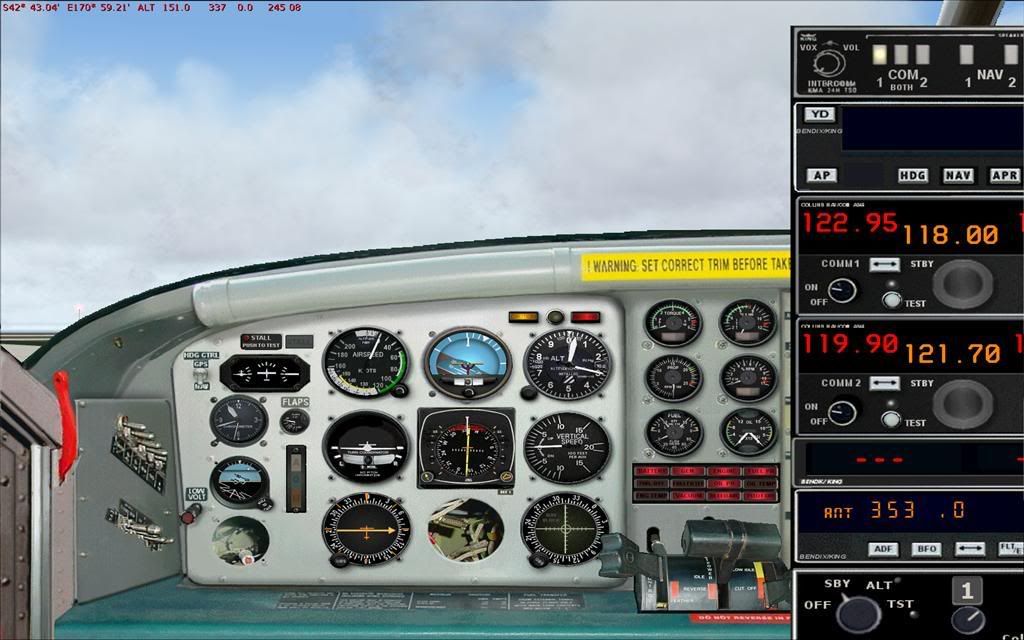
As it is now, by the time ive found and clicked on the radio button, changed frequency etc im a few miles down the track.....its obviously a lot quicker in the real world.
Timmo
NZFF Pro
 
Joined: Wed Oct 25, 2006 6:28 pm
Posts: 2056
Location: Tauranga

Postby Charl » Fri Nov 17, 2006 11:04 am

Timmo wrote:The main limitation with the 2d cockpit is lack of screen real estate: If i had another screen id put all the radio, GPS, engine controls onto that.

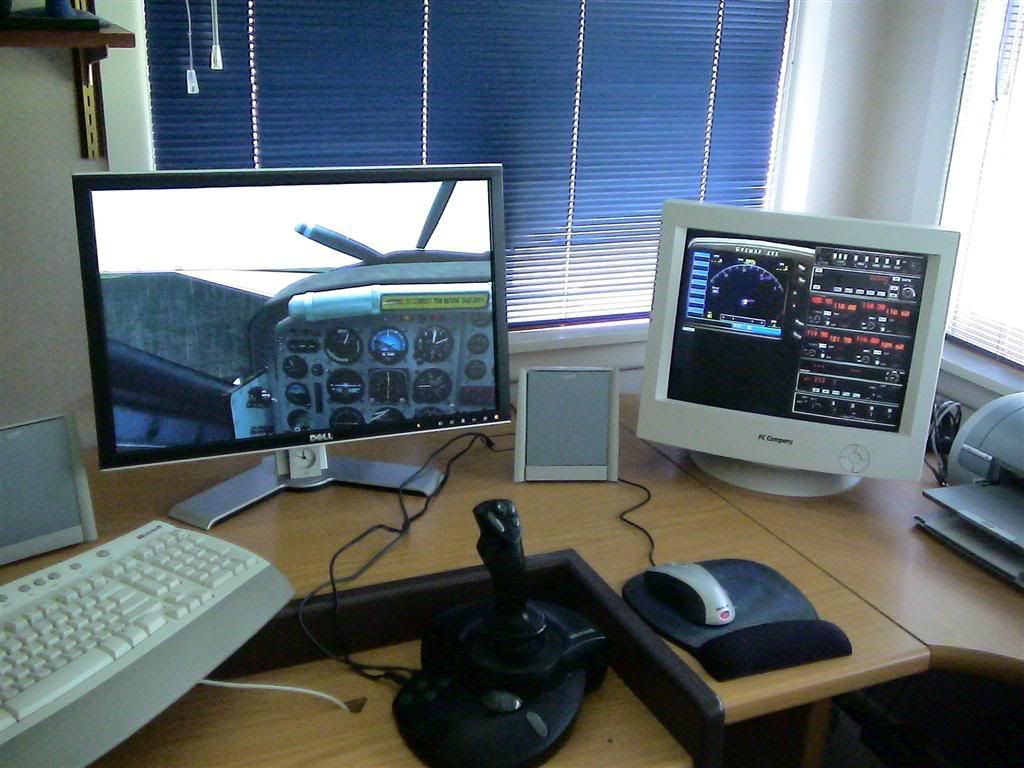
A second monitor becomes essential once you get used to it!
Here's something I read I know not where, but thanks to whoever figured it out.
I like to fly fullscreen, but then you can't have windows open for the other gauges.
Wrong!
In fullscreen mode, go to 2D cockpit view.
Open, say, the radio stack (Shift2) then nudge it a little more than halfway off the screen:

user posted image

Close it, and the next time you open it, it appears on the second monior!
You can arrange all your secondary instruments there.
Then, the best part, you can switch to VC view and they stay there.

user posted image

It changed the way I used the sim.
Second moniors also don't need to be that expensive, of course your video card must support this.
I was surprised that there didn't seem to be too much computing overhead when adding a monitor.
User avatar
Charl
NZFF Pro
 
Joined: Mon May 01, 2006 8:28 am
Posts: 9691
Location: Auckland

Postby Ian Warren » Fri Nov 17, 2006 3:38 pm

Well ... when the work needs to be done the VC! , but when course set happy outside SPOT and watch the dymanic's , workins off the plane , great .
I can't vote because VC/Spot is one . On the other side , people would say 2D/Spot , both have there caterogy and both good , but both also go with each other ?

VC/spot
2D/Spot

Maybe need to expand , I VC all the time in approach/takeoff but fix'd spot and veiw AC in the whether or in cruz .

Ian :)
Image
User avatar
Ian Warren
NZFF Pro
 
Joined: Fri May 05, 2006 5:23 pm
Posts: 41187
Location: AREA 51

Postby HardCorePawn » Sat Nov 18, 2006 4:31 pm

Close it, and the next time you open it, it appears on the second monior!
You can arrange all your secondary instruments there.
Then, the best part, you can switch to VC view and they stay there.



OR... it could send FS and/or your PC into some sort of LSD induced trip :blink:

When I go into fullscreen, open the radio stack and nudge it over its OK... but when I hit shift+2 to close the radio stack, FS locks up, the CPU jumps to 100% and the 2nd monitor looks like one of those magic eye pictures :(

I'm thinking FS and my video drivers dont get along, so no fullscreen for me... guess I'll just have to live with doing it the long way... windowed and undocking all the various windows onto the 2nd monitor...
"Son, we are about the break the surly bonds of gravity, and punch the face of God." -- Homer Simpson

Image
User avatar
HardCorePawn
Senior Member
 
Joined: Fri Sep 01, 2006 4:18 pm
Posts: 1277
Location: 2500' above Godzone

Postby SUBS17 » Sun Nov 19, 2006 5:04 am

Why 3d cockpits make 2dpits obsolete
http://www.simhq.com/_downloads/air/FSX ... ackIR4.zip
I was nearly expecting the pilot to walk down the aisle while watching this :D .
User avatar
SUBS17
Senior Member
 
Joined: Mon Jun 05, 2006 11:16 am
Posts: 1745

Postby ardypilot » Thu Feb 01, 2007 11:26 pm
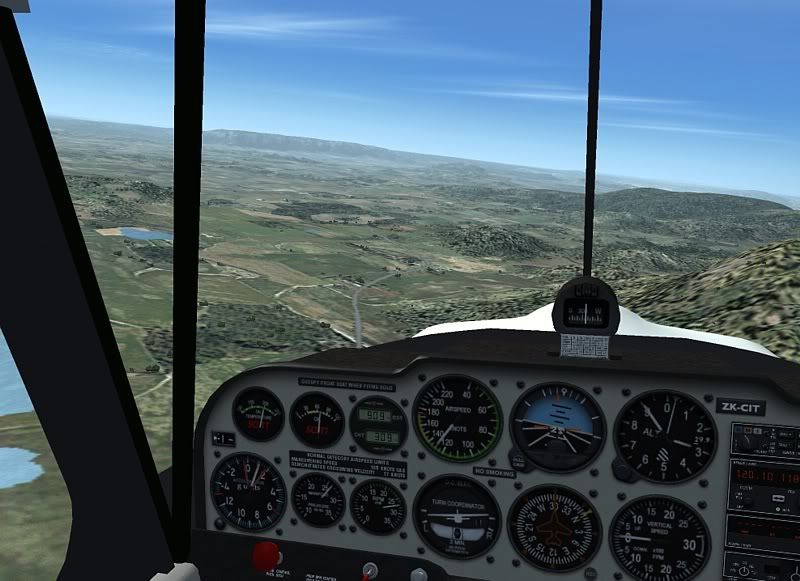
Over the last few weeks I have been learning to love the VC mode more and more, and now would change my poll vote from spot to virtual cockpit.

My favourite models include really decent VCs including the Carenado Collection, my Airhead Citabria, the Christian Eagle II and the FSNORDIC Maule, plus all the wonderfull FSX default aircraft.

user posted image

Panning around from inside is such a great perspectice and seeing everything bounce with the turbulance is something not represented from an outside view- plus it makes me feel more like I am really flying rather than just simming. Nuff said.
User avatar
ardypilot
NZFF Pro
 
Topic author
Joined: Wed Apr 26, 2006 10:01 am
Posts: 6802
Location: Auckland

Postby G-HEVN » Fri Feb 02, 2007 1:04 am

I voted 2D, and in FS9 that was/is certainly true.

In FSX, I'm starting to like the VC, particularly in the RealAir Marchetti, and Rick Ppier's Chippie. One of the problems (and it's still a problem in the default aircraft) with the VC is that switches and dials get hidden behind the yoke. These are often important things like engine gauges, carb/pitot heat switches etc, forcing you into the 2D panel to perform engine management etc. The other, more serious problem, is simply low resolution, crude and fuzzy 3D cockpits that are truly unpleasant to be in.

For IFR solely by instruments flying, the big IFR 2D panels are great until final approach where you need to be able to look up at decision height and (hopefully) see the runway! If I'm letting the autopilot fly (and lets face it, a hand flown 4 hour flight is hard work!), then I'm likely to wander about, make coffee, read the paper/email/forums and play about with the other views.

I do like to use the external views for looking at scenery, the plane, other traffic etc. but not for actual flying.
G-HEVN
 

Postby Alex » Fri Feb 02, 2007 8:28 am

G-HEVN wrote: For IFR solely by instruments flying, the big IFR 2D panels are great until final approach where you need to be able to look up at decision height and (hopefully) see the runway! If I'm letting the autopilot fly (and lets face it, a hand flown 4 hour flight is hard work!), then I'm likely to wander about, make coffee, read the paper/email/forums and play about with the other views.

I do like to use the external views for looking at scenery, the plane, other traffic etc. but not for actual flying.

Yep, thats what I do as well. :D

Alex
Alex
NZFF Pro
 
Joined: Fri Jul 14, 2006 3:39 pm
Posts: 3620

Postby Pato » Fri Feb 02, 2007 1:26 pm

steelsporran wrote: You're supposed to LAND as well?
Incidentally ZK-MAT, I find having aircraft shadow on helps.

Please inform a newbie how you have aircraft shadow on?. Cheers.
CPU: Intel Core i5 760 @ 2.8GHz. Motherboard: Asus P7P55 LX. RAM: Kingston Hyper X 8GB 1600mhz DDR3 Non ECC. SSD: Samsung 250GB. HDD: WD !TB.
GRAPHICS: Asus GTX460, Direct CU 1GB GDDR5 256bit video graphics card. PSU: Cooler Master eXtreme Power Plus 650W. CASE: Cooler Master Gladiator.
User avatar
Pato
Forum Addict
 
Joined: Sat Nov 18, 2006 1:41 pm
Posts: 469
Location: Kapiti Coast

Postby Alex » Fri Feb 02, 2007 2:48 pm

Its in your graphic display options as far as I know. :)

Alex
Alex
NZFF Pro
 
Joined: Fri Jul 14, 2006 3:39 pm
Posts: 3620

Postby JonARNZ » Fri Feb 02, 2007 3:08 pm

In terms of panel views being obscured in VC, in FSX I had a similar issue until I discovered if you hit the A button it will cycle through a number of panel closeups still in VC view to get around the problem, its fast, has sensible locations to get at those awkward spots under the yoke or tweak the radio, and works well once you are familiar with it.

If I had read the manual it wouldnt have taken me 2 months to find it <_<
ARNZX flightsim.co.nz
Asus Sabretooth X79 MB | i73930K CPU | 8GB DDR3 1600 C7 Ram | GTX 560Ti DCII OC | Corsair H80 Water Cooling
User avatar
JonARNZ
Senior Member
 
Joined: Sat Oct 21, 2006 12:49 pm
Posts: 1523
Location: Auckland

Postby BerG » Fri Feb 02, 2007 7:23 pm

Virtual cockpit for practising IFR, so it makes it easier when I get into the real thing.
BerG
 

Postby brownbox » Fri Feb 02, 2007 8:10 pm

I fly 99% of the time with the 3d VC, cause theres more buttons to press. It is a pain in the backside trying to click a switch on the other side of the cockpit in a 747 though ;)
Desktop:Core 2 Duo E4300 1.8@ 3.0Ghz@ 1.36v. 4Gb Supertalent DDR2-800 2.1v@ 5-5-5-15. Asus P5N-E SLI Pencil Modded. Corsair TX 650. 512MB Palit Geforce 8800GT. 2x200GB IDE+640GB SATAII. Windows Vista Ultimate X86. Samsung SH-S222A
Phone:Nokia N900 Vodafone
Car: 1993 Mitsubishi Mirage Asti Z. Steel Blue Pearl

1996 Toyota Curren 2.0L 5 Spd Manual Silver. 205/50/R16 on Enkei K-95. Lowered on Jamex Superlows. Remote locking. Remote boot release. Cruise control
1996 Mitsubishi GTO MR

Image
User avatar
brownbox
Senior Member
 
Joined: Thu Apr 27, 2006 10:55 pm
Posts: 1318

Postby G-HEVN » Fri Feb 02, 2007 8:30 pm

JonARNZ wrote:In terms of panel views being obscured in VC, in FSX I had a similar issue until I discovered if you hit the A button it will cycle through a number of panel closeups still in VC view to get around the problem, its fast, has sensible locations to get at those awkward spots under the yoke or tweak the radio,  and works well once you are familiar with it.

That assumes the model designer had the foresight to add the extra panel views (and also that the views he added are actually useful...). Certainly the RealAir panel views are good. :D Planes importted from FS9, though, are a different story...

Regarding BerG's comment on using the VC for IFR, Of course one of the things about real flying in any kind of bumpy/turbulent air (be it VMC or IMC) is that it can get real difficult to grab hold of the knobs and switches, and keep hold of them to change settings. The VC models this aspect of flying rather well!
Last edited by G-HEVN on Fri Feb 02, 2007 8:31 pm, edited 1 time in total.
G-HEVN
 

Postby ZK-TJL » Tue Feb 20, 2007 12:55 pm

JonARNZ wrote: In terms of panel views being obscured in VC, in FSX I had a similar issue until I discovered if you hit the A button it will cycle through a number of panel closeups still in VC view to get around the problem, its fast, has sensible locations to get at those awkward spots under the yoke or tweak the radio, and works well once you are familiar with it.

If I had read the manual it wouldnt have taken me 2 months to find it <_<

Jon.........That's classic :D . Gutted!!!!!!! HAHAHA

Any way.........I'm more VC since I got FSX. Currently I spend most of my time in small planes, the I find the VC works well in these aircraft for IFR and VFR flying.
ZK-TJL
Forum Addict
 
Joined: Sun Jan 07, 2007 12:20 pm
Posts: 490
Location: Christchurch

Previous

Return to General

Who is online

Users browsing this forum: No registered users and 12 guests




